Most startups die from miscommunication, not bad ideas.
The gap between non-technical founders and technical teams kills products before they launch. Wrong decisions. Wasted money. Products that don't match the vision.
You don't need to code. But you need to understand what your developers are talking about when they say "We need to migrate to cloud hosting" or "This would work better with server-side rendering."
This guide gives you exactly what you need to know. Nothing more, nothing less.
Basic Technical Concepts
Servers and Hosting
Think of a server as a computer that's always on, and connected to the Internet, serving your application to users.
Now you have a few hosting options you can choose depending on your project:
Shared Hosting ($5-20/month)
Shared hosting is an affordable approach for simple landing pages, blogs, and MVP websites with minimal traffic. You share resources with thousands of sites. Fine for simple landing pages. Terrible for anything with real traffic.
VPS (Virtual Private Server) ($20-100/month)
It's still one computer/server but this time you rent part of it without anyone else being able to access it or use your resources. This is suited for small to medium applications, when you need more control. But it can still break if you expect rapid growth or get unpredictable traffic spikes.
Cloud Hosting (Vercel, AWS, Google Cloud) ($0-1000+/month)
With cloud hosting your application runs on multiple computers/servers that scale automatically as your application and its traffic grows. This prevents 3am emergencies when your server crashes from traffic spikes. It is used by any serious startup product that needs to scale.
Real talk: If your developer says you need cloud hosting and you're still pre-launch, they might be over-engineering. But if you have users and they're pushing for cloud, listen to them.
Domains and DNS
A Domain is your name (example.com) on the Internet. You buy this yearly ($10-15) from registrars like Namecheap or Google Domains.
DNS (Domain Name System) is the phonebook of the internet. When someone types your domain, DNS tells their browser which server to connect to.
Why this matters:
- DNS changes take 24-48 hours to fully propagate (go live worldwide)
- If your developer says "DNS needs to update" don't panic when the site isn't live immediately
- Never give anyone access to your domain registrar account unless you absolutely trust them
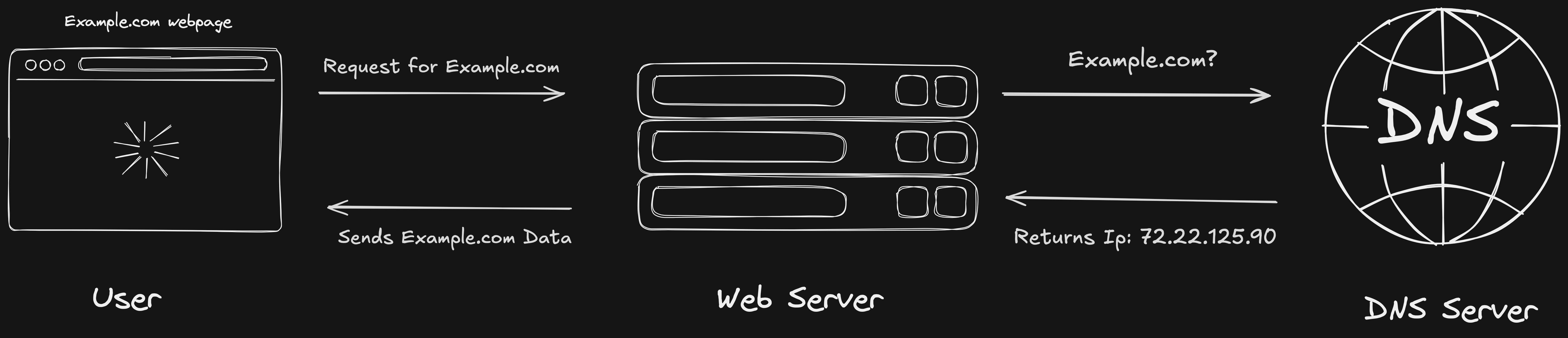
Web Architecture Evolution
Traditional Web (The Old Way)
10 years ago when you sent a request to a server to visit a web page, the server would build the entire page and then serve it to you. However there were a few drawbacks to this approach. It was slow and heavily reliant on the server. This resulted in users staring at a blank screen or a loading spinner for a long time. And we know users don't do that for more than 3 seconds, they just leave the page.
Modern Web (How It Works Now)
We've come a long way from then. Now we can leverage the power of both server and client (browser) to optimize our web applications.
With Client-Side Rendering (CSR), the server sends a basic HTML shell and JavaScript does all the work in the browser. The page loads fast initially but takes time to become interactive. Good for apps where SEO doesn't matter much, like dashboards behind a login.
With Server-Side Rendering (SSR), the server builds the complete HTML page with all the data before sending it to the browser. Users see content immediately, search engines can read it, but it takes longer for that initial response from the server.
React Server Components (the newest approach) let you mix both strategies in the same app. Some parts of your page can be built on the server and never need JavaScript in the browser at all. Other parts can be fully interactive. You get the best of both: fast loading, good SEO, and smooth interactivity where you need it.
What you need to know: When your developer talks about these approaches, they're discussing trade-offs between initial load speed, SEO requirements, and how interactive your app needs to be. The right choice depends on what your product does.
Key Technologies for Startups
These days, React and Next.js have become the current standards for building custom websites and web applications. Netflix, Airbnb, Facebook, TikTok, Twitch are all using them. Thanks to the large community around these technologies, it's very easy to hire developers who are proficient in using them. Besides, the React community has already built dozens of pre-built components, which makes it much faster and more efficient to develop an app with this stack.
Next.js takes React and adds everything you need for a production app: server-side rendering, automatic routing, and built-in optimizations. It's deployed on Vercel which makes hosting extremely simple. Startups choose it because it gives you fast development, great performance, and scales easily without you having to think about it.
Now, React and Next.js aren't the only options out there. Vue, Svelte, Angular, and others all have their strengths. But React dominates the market, which means easier hiring and more resources. For most startups, that matters more than technical differences. I'll dive deeper into comparing different frameworks in a future post, but for now, know that React/Next.js is the safe bet that won't limit you.
Why Not Just Use WordPress?
WordPress is perfect for blogs, content-heavy websites, and simple marketing pages. If you're building something that's mostly about displaying content, WordPress, Webflow, or Framer are still solid choices.
But try building an interactive dashboard in WordPress. Or a real-time chat feature. Or anything that feels like a mobile app on the web. You'll end up fighting the tool instead of building your product. It's like using a hammer to screw in a bolt, it'll technically work, but it's not the right tool.
Modern frameworks like React and Next.js were built specifically for interactive applications. Things like SaaS dashboards, real-time features, and products that need to scale quickly. If your product needs to feel like an app, not a content website, that's when you go modern.
Real example: Building a todo app in WordPress is like using a hammer to screw in a bolt. It'll work, but it's not the right tool.
- Use WordPress for simple blog or marketing sites
- Use React/Next.js for SaaS product, dashboard, or app-like experience
Practical Tips for Founders
Choosing the Right Tech Stack
When your developer proposes a tech stack, there are four questions you need to ask:
1. "Why this technology over alternatives?" A good answer explains trade-offs based on your specific product needs. Red flag? "Because it's what I know" or "Because it's the newest." You're not paying them to learn on your dime or chase trends.
2. "How easy is it to hire developers for this?" React and Next.js? Very easy. Some obscure framework they want to try? You'll struggle to find talent when they leave. This matters more than you think.
3. "What's the cost to scale this?" Some technologies are cheap to start but expensive to scale. Others cost more upfront but scale automatically. Make sure you understand the long-term costs, not just the MVP price tag.
4. "Can we start simple and upgrade later?" Good tech stacks allow gradual improvements. Bad ones lock you in and require complete rewrites when you need to scale. Always choose the one that lets you start simple.
Watch out for these red flags in tech decisions. If your developer wants to use 5+ new technologies they've never used before, you're their learning playground at that point. Also red flag if they can't explain decisions in simple terms, every problem needs a complex solution, or they dismiss your concerns about cost or timeline.
Green flags look like this: they suggest proven, boring technologies. They explain trade-offs honestly instead of selling you on the "best" thing. They recommend starting simple and scaling later. And they've built similar products before, so they know what actually works.
Communication with Technical Teams
Stop saying "Can we just add a quick button that does X?" Nothing is "quick" in development. Or "The competitor has this feature, why don't we?" You don't know their tech debt or team size. And never assume "This should be simple, right?" Assumptions kill timelines.
Instead, ask "What's the effort level for adding X feature: small, medium, or large?" Or "What would we need to change in our architecture to support this?" Or "What's the trade-off if we prioritize this over that?" These questions show you respect the complexity while still getting clear answers.
Here are a few terms you should know. Technical debt means shortcuts taken to ship faster that will slow you down later. Refactoring is rewriting code to be cleaner and faster without changing what it does. Edge cases are rare scenarios that break things, and they happen way more than you think. API is how different parts of your product talk to each other.
When developers use jargon, stop them immediately. Ask them to explain it as if you're 12 years old. Tell them "I need to understand the 'why' not the 'how.'" This isn't about doubting their skills, it's about making sure you can make informed decisions.
And set realistic expectations together. "Simple" features often take 2-3x longer than expected. Bugs are inevitable and don't mean your developer is incompetent. Good code takes time because fast code often breaks later. Your developer's job is to prevent problems you don't see coming, so trust them when they push back on timelines.
Final Take
You don't need to become a developer. But you need to understand enough to make informed decisions about technology choices, communicate effectively with your technical team, know when you're being over-sold or under-served, and budget realistically for development.
Three habits that will save your startup: First, ask "why" relentlessly. Not to challenge, but to understand the reasoning behind technical decisions. Second, learn one technical concept per week. Watch a 10-minute YouTube tutorial on something your team mentioned. It adds up faster than you think. Third, trust but verify. Get second opinions on major technical decisions from someone who doesn't have skin in the game.
The best non-technical founders I've worked with didn't know how to code. But they knew how to ask the right questions, spot red flags early, and create an environment where technical teams could do their best work.
Your job isn't to understand every line of code. It's to understand enough to lead effectively. That's it.
Resources to Continue Learning
Want to keep learning? Start with freeCodeCamp.org (do just the first few modules to understand how developers think) and the Fireship YouTube channel (100-second explainer videos perfect for busy founders). Search "How does [technology] work" on YouTube when your team mentions something new.
Stay curious, but don't try to become the expert. That's what you hired your team for. And if you need a second opinion on a major technical decision, that's completely okay, send it to a trusted technical advisor and ask "Is this reasonable?"
Next up: “SaaS Development Not-To-Do List” Subscribe to get it in your inbox next week.